Why Did This Debit Transfer Fail?
Last updated: April 11, 2026
Overview
If you are using any of Astra’s payment solutions which involve debit card transfers, you’ll most likely encounter a debit transfer failure, sooner or later. Debit Transfer failures are common and they do not necessarily equate to fraudulent behavior. The following articles describe where a debit transfer can fail, events that cause failures, debit network decline codes, common failures, and how you can handle transfer failures.
AFTs and OCTs
Before discussing why a Debit Transfer may fail, let’s look at the possible places where a Debit Transfer can fail. There are two types of Debit Transfers: AFTs and OCTs.
An Account Funding Transaction, also known as an AFT, is a transfer in which funds are automatically debited or “pulled” from a User’s card. They are a key component of card-to-card, card-to-account, and card-to-wallet transfers.
An Original Credit Transaction, also known as an OCT, is a transfer in which funds are automatically credited or “pushed” to a User’s card. They are a key component of card-to-card, account-to-card, and wallet-to-card transfers.
A Debit Transfer may fail on the AFT or OCT. Here are some simple examples:
Debit AFT Failure: A User wants to transfer $100 from Debit Card A to Debit Card B, but the User only has $75 in their account. When they initiate the transfer, it fails immediately and the debit network returns the following decline code: 51-Insufficient Funds.
Debit OCT Failure: A User wants to transfer $100 from Debit Card A to Debit Card B, but Debit Card B is frozen. When the transfer is initiated, $100 will be pulled or debited from the User’s account via an AFT, but the transfer will fail on the OCT, because the push or credit of funds will be blocked due to the frozen card. In this scenario, the debit network may yield one of several possible decline codes, but most commonly: 12-Invalid Transaction
Debit Network Decline Codes
A decline code is returned from the Debit Networks when a failure occurs during the AFT or OCT. A decline code is designated by a number representing the decline code and a title, which describes the decline reason from a high-level. Here’s an example: 51-Insufficient Funds. 51 designates the specific decline code, while Insufficient Funds describes the decline reason. In this example, the decline code refers to a failed Debit AFT, which couldn’t be processed because the User did not have enough funds in their account to fund the transfer.
There are approximately 100 debit network decline codes and while some are self-explanatory, some can be cryptic and hard to understand. Please see our Guide to Debit Decline Codes for a full list of codes and descriptions.
What Happens When a Debit Transfer Fails?
When an AFT or OCT fails via Astra, several things happen in parallel. The Transfer object status will change from pending to failed. Astra will pipe this transfer status change along with the failure reason through to your client via API and the Astra Dashboard. In addition, if your client is subscribed to webhooks, Astra will ping your system with a transfer_updated and routine_update webhook informing your client of a status change in real-time.
Transfer Failure Information via the Astra Dashboard
To see why a transfer failed via Astra’s Dashboard, locate the Transfer by ID via the Transfer table, or navigate to the User’s profile and locate the Transfer there. Next to the failed status, an info icon will launch a modal window articulating the transfer failure reasons, like so:
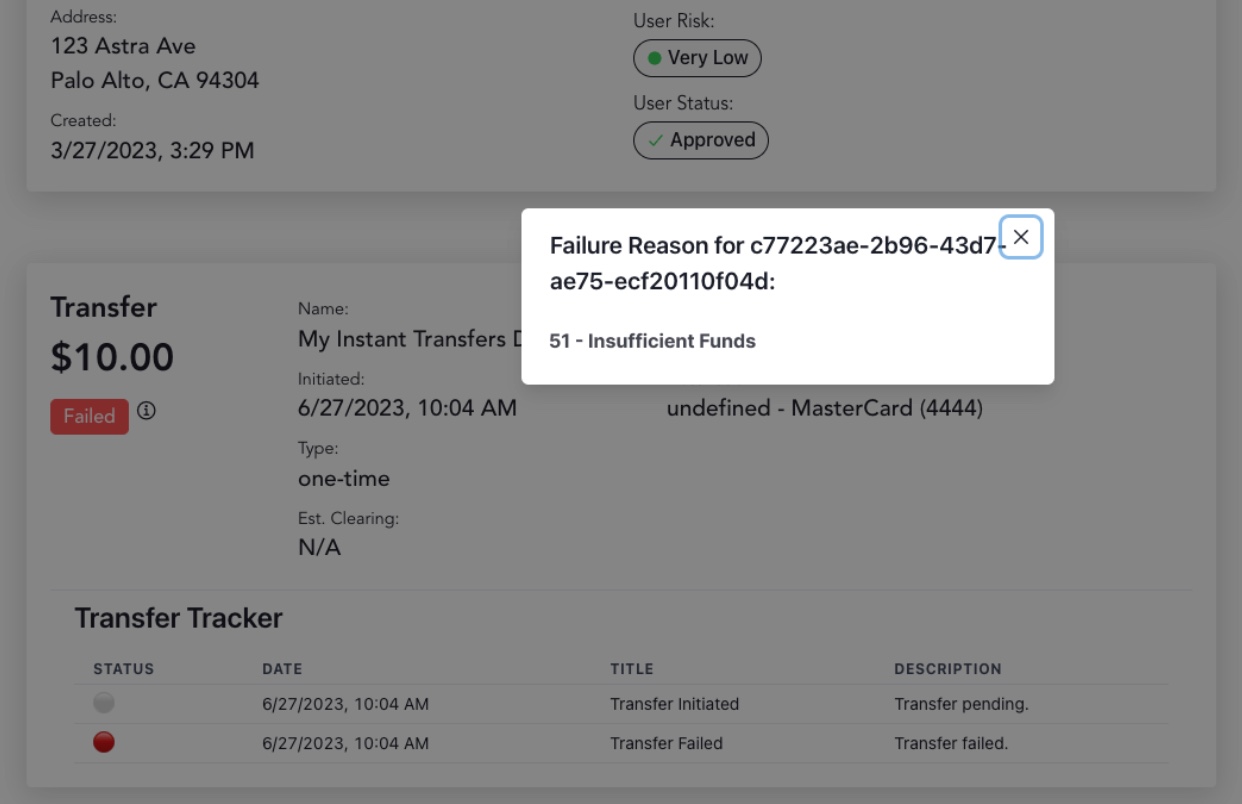
In addition, the failure event will be logged in the Transfer Tracker, which is located in the Transfer detail page.
Transfer Failure Information via the API
To see why a transfer failed programmatically, call the GET v1/transfers. The update response will include an updated status and new field called failure_reason, which will list the debit network decline code.
Most Common Reasons a Transfer may Fail
Although a debit transfer can fail for various reasons, Astra has observed several common causes outlined below.
Frozen Card
If a card is frozen and a transfer is initiated, the funds will be pulled from the externally linked debit card, but will not be credited or pushed onto the destination card. Funds will not be automatically reverted to the externally linked debit card and the funds will be held until the destination card is unfrozen. We recommend that your team obtain the status of a card (i.e. Frozen or Unfrozen) before sending a Routine request to Astra to avoid the scenario described here.
Insufficient Funds
Upon initiating a transfer, if a user has a negative balance or insufficient funds via their externally linked Debit Card, the transfer will fail immediately due to 51-Insufficient Funds. No funds will be pulled from the User’s source debit card.
Transfer Amount Exceeds Available Limit
Astra can process up to $10,000 per transfer per User. A User may initiate several transfers that are equal to or less than the per transfer limit. If the amount of a transfer exceeds the $10,000 limit, the Routine will immediately fail and a transfer will not be created. The Routine failure reason will state the following: <amount> is over the transfer limit of <amount>
Debit Issuing Bank Limits
It’s important to verify the established deposit limits through your debit issuing bank partner. You may have an established deposit limit (i.e $2500 per day, per account). For deposit limits, we recommend that you build a queueing system that calculates the aggregate deposit amount before sending Astra a Routine request, to ensure that the end-user doesn’t exceed the daily aggregate deposit (or similar) limit. When a User initiates a transfer and the amount exceeds the destination account daily depository limit, the Debit OCT push will fail and Astra will not be able to retry the credit until the next day.
When a transfer fails with a decline code like this, we recommend disabling routine creation to that specific card for 24 hours, as any subsequent routine with that same card as the destination will most likely fail for the same reason, resulting in a backlog of transfers that will be retried the next day.
Related list of decline codes pertaining to bank limits:
61 - Exceeds withdrawal amount limit
65 - Exceeds withdrawal
82 - Count exceeds limit (VISANet)
Issuing Bank Debit Card Rules
Externally linked Debit Cards may have rules defined by the issuing Bank, such as withdrawal limits and how many transactions are permitted per day. Messages regarding these failures are reported to Astra through the Visa or Mastercard network. Please see our Guide to Debit Network Decline Codes to learn more.
Card Is Not Push Enabled
If a card is not “push enabled”, Astra will be unable to credit funds to the end-user’s destination card. This is an issue with that card's product settings and cannot be manually changed. This limitation was put in place by the issuing bank of said debit card. The end-user can contact their issuing bank to learn more, but they’ll need to connect a new debit card that is push enabled. Astra obtains this information once the card is authorized via the debit networks and makes this information available via API and through the Astra Dashboard. .
Card Is Not Pull Enabled
If a card is not “pull enabled”, Astra will be unable to pull funds to the end-user’s source card. This is an issue with that card's product settings and cannot be manually changed. This limitation was put in place by the issuing bank of said debit card. The end-user can contact their issuing bank to learn more, but they’ll need to connect a new debit card that is pull enabled. Astra obtains this information once the card is authorized via the debit networks and makes this information available via API and through the Astra Dashboard.
Frequently Asked Questions
Are prepaid cards supported?
Prepaid cards are presently supported, but capabilities can vary by institution.
Would a prepaid card be the reason for a transfer failure?
A transfer could be declined (debit decline code) for a myriad of reasons, not just due to the card type being prepaid. Regardless of card type, the debit decline code (the reason for the transfer failure) is ultimately dependent on the issuing bank. The same transaction behavior for a user can have different results depending on the issuing bank. One bank might have stricter fraud controls than another bank, and the decline codes used might also differ.