Guide to Smart Card Authorization
Last updated: May 5, 2026
Overview
If you are leveraging Astra for Instant Funding and/or Instant Disbursements, your Users will be connecting Debit Cards to their profiles.
The following guide provides a detailed overview of Debit Cards, what they are used for, how they are authorized for use, and how to understand the varying data points that make a card eligible or ineligible for a given payment route.
Guide Index:
What are Debit Cards?
What are Debit Cards used for? (AFTs & OCTs)
Pull Enabled & Push Enabled Settings
How are Debit Cards Authorized for use?
Card Authorization Results
Common scenarios to anticipate
Reviewing Flagged Cards
Common Transfer Failure Reasons
Additional Information
What are Debit Cards?
A debit card is a payment card that's linked to a balance, typically a checking account, and allows you to spend money directly from that account. Debit cards are issued by banks and credit unions, and they can be used to make purchases, withdraw cash from ATMs, and more.
What are Debit Cards used for? (AFTs & OCTs)
Through Astra’s payment platform, a User can fund an account with their debit card, or withdraw funds to their debit card.
Account funding or deposits are made possible by Account Funding Transactions, also known as AFTs. Account withdrawals, disbursements, or payouts to a Debit Card are made possible by Original Credit Transactions, also known as OCTs.
An Account Funding Transaction, also known as an AFT, is a transfer in which funds are debited or “pulled” from a User’s card. They are a key component of card-to-card, card-to-account, and card-to-wallet transfers.
An Original Credit Transaction, also known as an OCT, is a transfer in which funds are automatically credited or “pushed” to a User’s card. They are a key component of card-to-card, account-to-card, and wallet-to-card transfers.
Pull Enabled & Push Enabled Settings
When a Bank issues a Debit Card, specific product capabilities are defined for said Card. These capabilities include whether a card is Push Enabled or Pull Enabled:
A Pull Enabled Debit Card means funds are permitted to be debited or “pulled” from the User’s account via their Debit Card by a Merchant through an AFT.
Note: If a card is not “pull enabled,” Astra will be unable to debit funds from the User’s Debit Card. This is a product setting specific to the User’s card and Astra cannot modify or override this setting, as this limitation was put in place by the issuing bank of the Debit Card. Astra obtains this information once a Debit Card has been authorized via the Debit Networks. We make this information available via API and through your Astra Dashboard.
A Push Enabled Debit Card means funds are permitted to be credited or “pushed” to the User’s account via their Debit Card by a Merchant through an OCT.
Note: If a card is not “push enabled,” Astra will be unable to credit funds to the User’s Debit Card. This is a product setting specific to the User’s card and Astra cannot modify or override this setting, as this limitation was put in place by the issuing bank of the Debit Card. Astra obtains this information once a Debit Card has been authorized via the Debit Networks. We make this information available via API and through your Astra Dashboard.
How Does Debit Card Verification Work?
In order for a Debit Card to be authorized for use, Astra must receive the following details:
First Name on Card
Last Name on Card
PAN
CVV
Expiration Date
Physical Address on file at the Issuing Bank
Whether card details are provided through our PCI Compliant Debit Card form or through our POST Cards endpoint, all of the fields above must be included in order for Astra to begin the Card authorization process.
Upon submission, these details are passed from Astra through to the Debit Networks, who then relay these details to the issuing bank of the Debit Card. The Issuing Bank then verifies all of the details. The Issuing Bank then returns a series of responses regarding each data point to the Debit Networks, who then relay this information back to Astra.
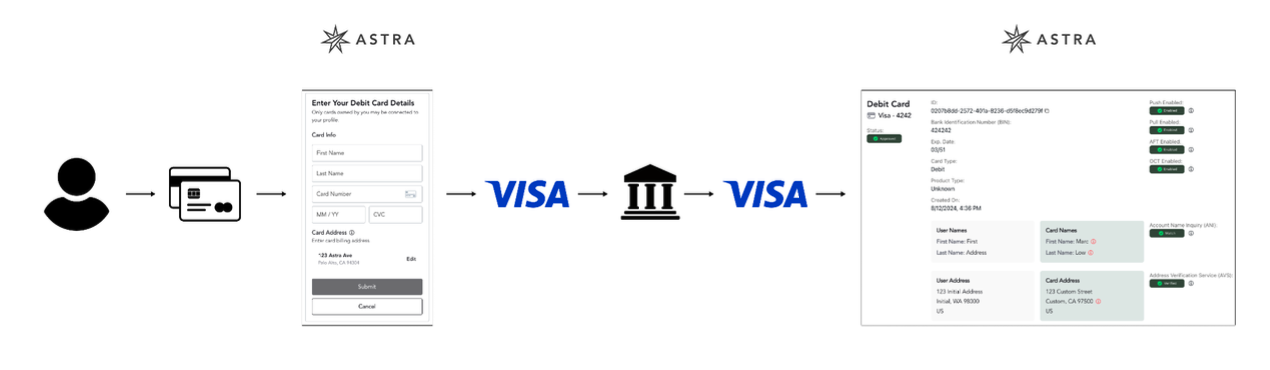
Card Authorization Data Flow
Card Authorization Results
Through the Card Authorization process, Astra receives critical information from the Issuing Bank about a Debit Card (by way of the Debit Network). Astra displays these results in your Astra Dashboard:
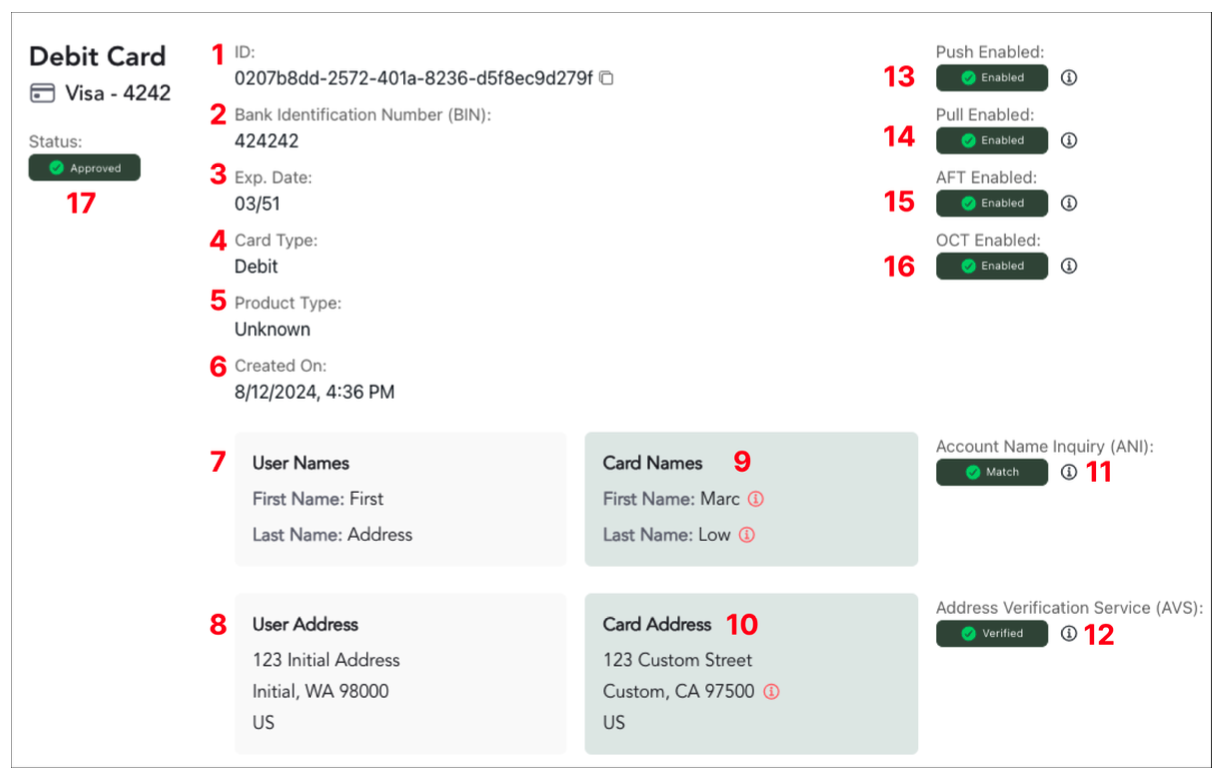
The Card Details View in the Astra Dashboard
Card ID: The unique Astra Card identifier for the connected Card.
BIN: The Bank Identification Number, abbreviated as BIN. This is the first six digits of the Card. A single bank is associated with a BIN but multiple product types may be used for Cards issued through the BIN. The BIN can be used to identify the issuer, product type, and more: https://docs.astra.finance/reference/get_v1-bins-bin.
Expiration Date: The Expiration Date of the Card.
Card Type: Results include Debit, Prepaid, Credit, Unknown. The Card Networks disallow Credit Cards to be used for AFTs.
Product Type: Results include Consumer, Business, Commercial, Unknown. See item 2 for related information.
Created On: When the Card was initially added to the Astra Platform through your client.
User Names: The First and Last name of the User, submitted to Astra through the UserIntent endpoint.
User Address: The Physical Address of the User, submitted to Astra through the UserIntent endpoint.
Card Names: The First and Last Name entered when the Debit Card was added to the Astra Platform.
Note: the names you see in the Dashboard are not the names returned by the Issuing Bank.
These are the name fields that the User explicitly provided to Astra when submitting their Card details.
The Issuing Bank only returns the following data: Full Match, Partial Match, No Match, or Unknown.
We do not have access to the name on file at the Issuing Bank
Card Address: The Physical Address / Billing Address entered when on the Debit Card was added to the Astra Platform.
Note: the address you see in the Dashboard is not the address returned by the Issuing Bank.
This is the address the User explicitly provided to Astra when submitting their Card details.
The Issuing Bank only returns the following address verification data: True, False.
Note: The Issuing Bank does not return the address that is on file. Astra does not have access to this data.
Account Name Inquiry (ANI): The Issuing Bank’s results of the First and Last name submitted with the Card details. The results are: Full Match, Partial Match, No Match, Unknown.
Full Match: The First and Last name provided match what is on file at the Issuing Bank
Partial Match: Either the First and/or Last name collectively matches in part or in full what is on file at the Issuing Bank, but not a full match for both.
No Match: Neither the First name or Last name match what is on file at the issuing bank.
Unknown: The Issuing Bank doesn’t participate in ANI services.
Note: The Issuing Bank does not return the name that is on file. Astra does not have access to this data.
Address Verification Services (AVS): The Issuing Bank’s results of the Physical Address submitted with the Card details. The verification results are: True, False.
True: the street number and zip code for the Address provided matches what is on file at the Issuing Bank
Unverified: the street number and zip code for the Address provided does not match what is on file at the Issuing Bank.
Push Enabled: if the Card has the capability to have funds credited or “pushed” to the User’s account. Results are: Enabled, Disabled. Results are: Enabled, Disabled. Note: Astra cannot override these settings.
Pull Enabled: if the Card has the capability to have funds debited or “pulled” from the User’s account. Results are: Enabled, Disabled.Note: Astra cannot override these settings.
AFT Enabled: Astra’s smart card authorization solution determines if a Card should be eligible to be used for AFTs. This outcome is determined by multiple data points, informed by a sophisticated model applied across and informed by our entire platform. A combination of a User data and AVS + ANI results inform this outcome. Results are: Approved, Rejected
OCT Enabled: Astra’s smart card authorization solution determines if a Card should be eligible to be used for OCTs. This outcome is determined by multiple data points, informed by a sophisticated model applied across and informed by our entire platform. A combination of User data and AVS + ANI results inform this outcome. Results are: Approved, Rejected. If a Card is not approved for OCT use, the Card status itself will be rejected.
Card Status: This status determines whether or not a Card can be used. The statuses are:
Approved: Card has been approved for use. Only Cards with this status are authorized for use.
Flagged: Client has the option to approve or reject the card via the Astra Dashboard. The User will be unable to use their Card while the status is flagged.
Rejected: Card has been rejected. The user will be unable to utilize this Card.
Removed: Card has been removed by the user/client.
Note: A Card may be approved, but not eligible for AFT use.
Note: We recommend subscribing to Card Webhooks in order to stay informed about Card status changes in real-time.
Common Scenarios to Anticipate
Scenario 01: Card Status approved | AFT Enabled approved
The Card recommendation is that the Card should be fully approved for use, and can be used for both AFT and OCT transactions.
Scenario 02: Card Status approved | AFT Enabled rejected
The Card recommendation is tha the Card should be approved for OCT transactions only. Due to specific risk factors such as User Risk Level, AVS results (Unverified), Address Mismatch (AVS is Verified, but Card Address doesn’t match User Address), and or ANI results (Partial Match), Astra’s smart card authorization solution has recommended that the Card cannot be used for AFTs, as there is a higher likelihood or probability of the AFT transaction resulting in a chargeback.
Scenario 03: Card Status flagged
The Card has been flagged for review due to a combination of factors such as User Risk Level, AVS results (Unverified), Address Mismatch (AVS is Verified, but Card Address doesn’t match User Address), and or ANI results (Partial Match). Flagged Cards can be rejected or approved by your Compliance & Risk team via your Astra Dashboard.
Scenario 04: Card Status rejected
The Card cannot be used for any transactions. Astra’s smart card authorization solution has determined that there is not enough evidence to prove card ownership, or there is explicit data indicating the card is not owned by the User who has connected the card. In most cases, a Card is rejected because the ANI results are No Match.
Note: Cards can also be rejected if they haven’t been activated or the issuing bank returns an unsuccessful authorization attempt.
Scenario 05: Card Status removed
The Card has been removed (deleted) by the User or Client. Removed Cards need to be re-added in order to be evaluated for future use.
Reviewing Flagged Debit Cards
When a Card is flagged, the User will be restricted from using said Card. A flagged Card can be either approved or rejected.
Only Astra Dashboard users with the Admin or Owner role will have the option to approve or reject a flagged card. Astra Dashboard Users with the Read-Only role will be unable to approve or reject a flagged card.
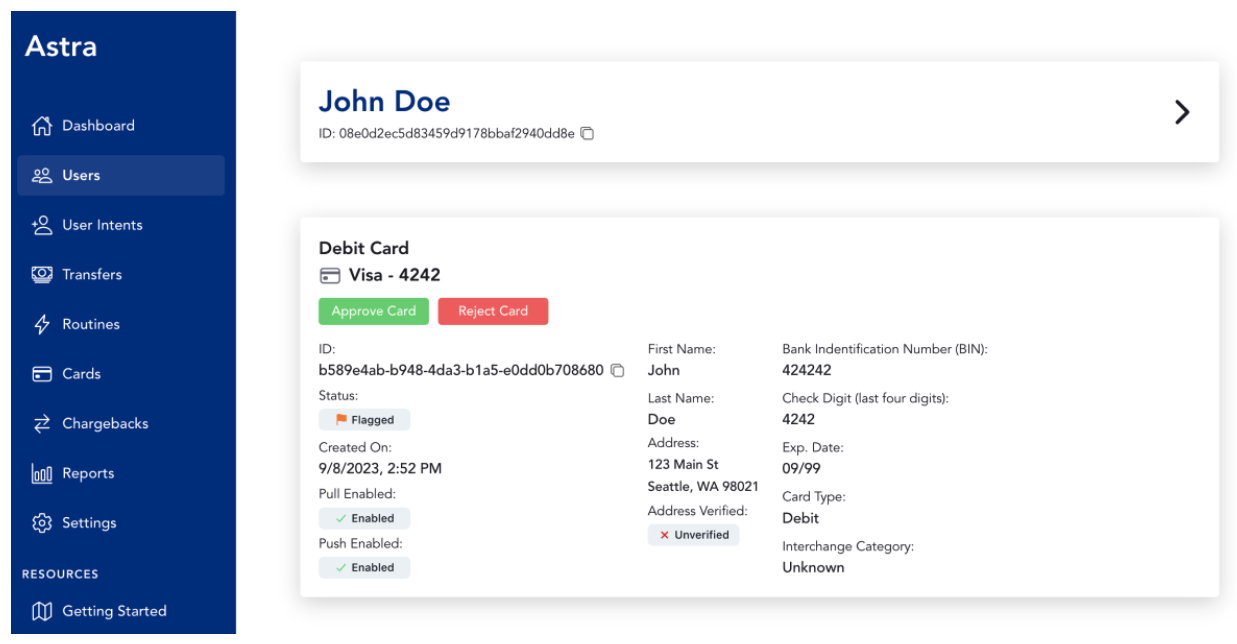
A “Flagged” Card in the Astra Dashboard
Additional Notes
Astra’s Instant Funding and Instant Disbursement programs are a 24/7/365 service that are not restricted by weekends or federal holidays.
Astra’s Instant Funding program currently supports Visa and Mastercard Debit Cards. Debit cards such as Discover or Amex are not supported.
Every Debit Card connected to Astra through your Client will be logged and retrievable via the Astra Dashboard and via API.
Astra’s Instant Funding and Instant Disbursement programs do not support Credit Cards. Credit Cards will be blocked upon Routine creation. Astra cannot determine if a Card is a Credit Card until the Card has been submitted for authorization to the Debit Networks.
A User may only connect Debit Cards that were issued to them. If a User connects a Debit Card that doesn’t belong to them, the Card will be rejected and not authorized for use. Additionally, the User may be suspended from our Platform for fraudulent behavior and for violating our terms and conditions.
A User must enter all card information correctly. Submitting incorrect information for the First and Last Name, PAN, CVV code, Expiration Date, and or Physical Address, could result in an unsuccessful card authorization, AFT ineligibility, and or a Card status of flagged.
A User must enter the physical address that is associated with the Card they connect. If the address is incorrect, their card may be flagged, which will require additional review by your Compliance & Risk team, or it will be approved, but may not be eligible for AFTs.
A User may connect up to 3 externally linked debit cards at once over a 30 Day period. This is a security measure to prevent bad actors from cycling through stolen Debit Cards.
A User’s Risk Level will determine the number of instant transactions that can be made in a 24-hour period. A Low Risk User is granted an unlimited number of transfers in a 24-hour period, while a High Risk User is limited to one transfer in a 24-hour period.
A combination of factors including the User’s Risk Level, AVS results, Physical Address discrepancies, and ANI results, may result in the User’s Card getting flagged or the card getting approved, but with AFT use disabled.
If a User creates 3 transfers within a 24 hour period that fail due to one or a combination of the following high risk, fraud failure reasons, the User will be automatically suspended:
04 pickup
41 merchant should retain card (reported lost)
43 card reported stolen
59 suspected fraud
If Astra receives a chargeback, we will automatically suspend the User profile associated with the chargeback and reject the associated Card. Astra will dispute the chargeback and will communicate important updates to your team. Astra provides Chargeback webhooks, and a Chargeback Table and Reporting via your Production Astra Dashboard.