A Guide to Routine & Transfer Statuses & Webhooks
Last updated: September 11, 2026
Overview
Understanding the relationship among Routines, Transfers, and their statuses is fundamental to building robust integration with Astra. This guide explains how these two objects relate to each other, their respective status flows, and why listening to webhooks is critical for maintaining an accurate view of your program’s payment activity.
Refresher | What Are Routines and Transfers?
Routines are the instruction set or ingredients for creating Transfers, while Transfers are the object that actually facilitates the movement of funds between a source and destination account or card. Transfers are always the source of truth for the status of an end-to-end payment.
A Transfer cannot exist without a parent Routine object. However, a Routine can exist without ever creating a child Transfer. We’ll highlight some examples in later sections.
Refresher | What Are Webhooks?
Astra uses Webhooks to send programmatic updates when the status of a core object in our system changes. Astra presently sends Webhooks for the following object status changes:
We also have the option to enable a Webhook when externally created Wires or ACH Transfers settle in an FBO+ Account / Payment Instrument. See more information here
With the exception of Payment Instrument Webhooks, Astra’s other Webhooks simply include the resource_id of the object that has had a status change. For example, if a Transfer’s status changes from pending to processed, the transfer_updated Webhook payload would include the transfer_id (from the resource_id property in the webhook payload) of the Transfer that has had a status change. The webhook payload will not include the new status of the object. To fetch the updated status of the Transfer object, you’d need to invoke the GET Transfer resource (and optionally the GET Transfer Segments resource for details on each transfer segment).
Routine > Transfer Relationship
In this section, we’ll look at the core relationship between Routine & Transfer statuses along with corresponding Webhooks.
Successful Transfer Scenario
In this example, a Routine spawns the creation of a Transfer, which successfully processes. Here is a breakdown of the events.
The Routine passes validations and is successfully created, yielding a Routine status of
activeThe Routine kicks off the creation of a child Transfer object, which has the status of
pendingThis triggers a
transfer_createdwebhook.
Once the funds settle in the destination account, the Transfer’s status will change to processed.
This triggers a
transfer_updatedwebhook.
The parent Routine’s status updates to completed
This triggers a
routine_updatedwebhook.
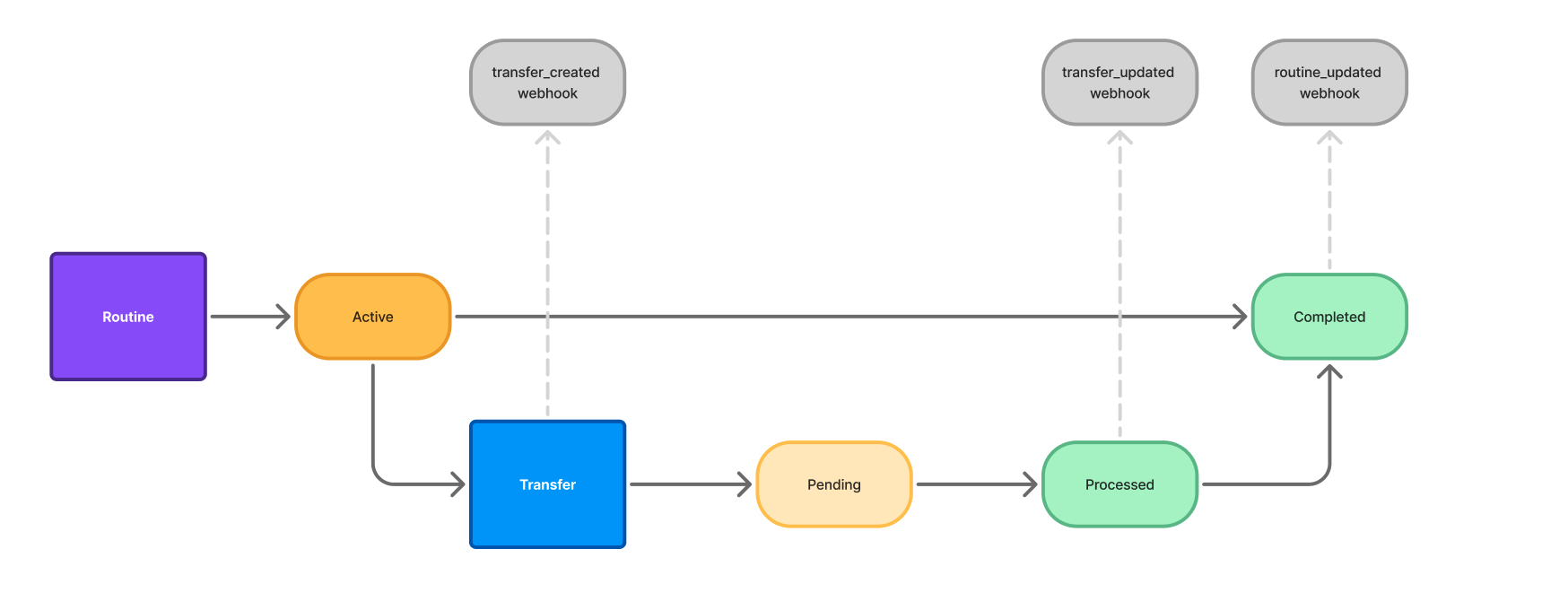
Failed Transfer Scenario A
In this example, a Routine spawns the creation of a Transfer, which fails before the funds can settle. Here is a breakdown of the events:
The Routine passes validations and is successfully created, yielding a Routine status of
activeThe Routine kicks off the creation of a child Transfer object, which has the status of `pending`
This triggers a
transfer_createdwebhook.
In this scenario, the destination account is not enabled for RTP/FedNow (real-time) payments, so Astra is unable to successfully credit the funds to the destination account. As a result the Transfer status updates to
failedThis triggers a
transfer_updatedwebhook.
The parent Routine’s status updates to
failedThis triggers a
routine_updatedwebhook.
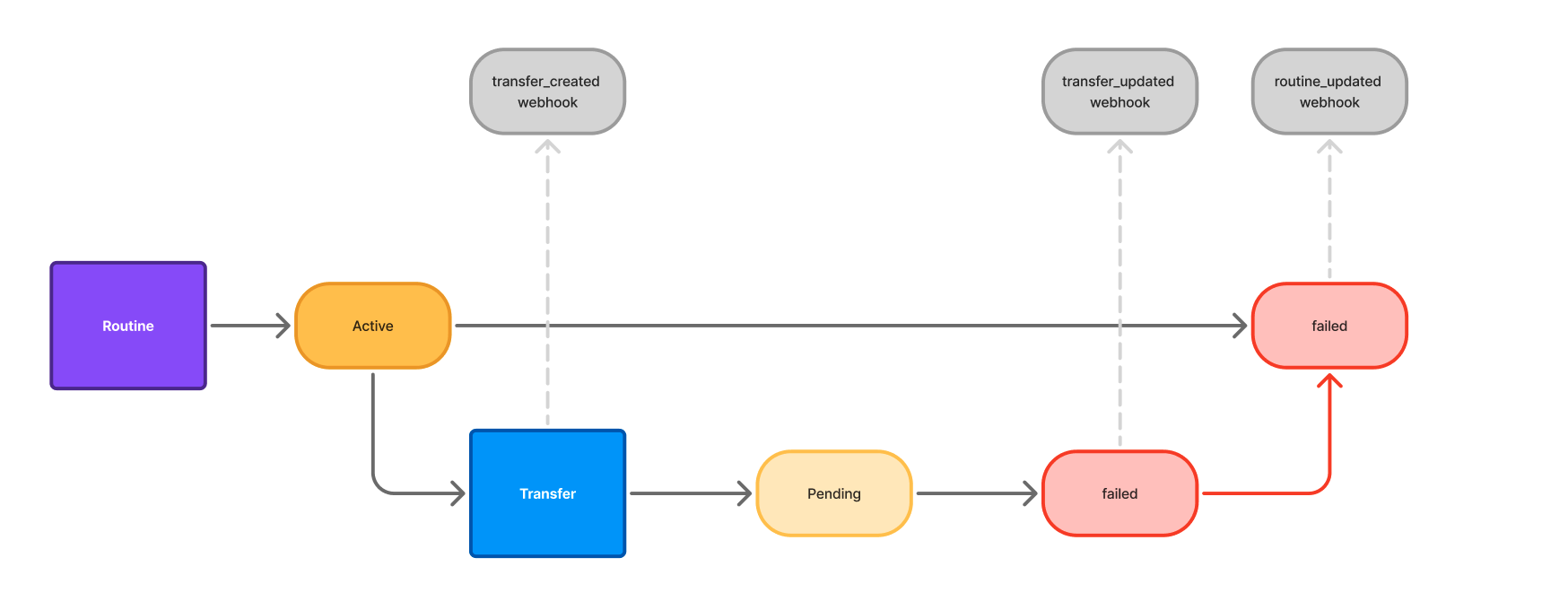
Failed Transfer Scenario B
In this example, a Routine spawns the creation of a Transfer, which fails after the funds have settled in the destination account due to a Return Code. Here is a breakdown of the events:
The Routine passes validations and is successfully created, yielding a Routine status of
activeThe Routine kicks off the creation of a child Transfer object, which has the status of `pending`
This triggers a
transfer_createdwebhook.
Once the funds settle in the destination account, the Transfer’s status will change to
processed.This triggers a
transfer_updatedwebhook.
The parent Routine’s status updates to
completedThis triggers a
routine_updatedwebhook
In this scenario, the RDFI triggers a Return Code, which Astra receives two Business Days later. In this example, the account was closed and we received an R02. The Transfer status updates from
processedtofailed.This triggers another
transfer_updatedwebhook.
The parent Routine's status remains unchanged, in
completed.
Implementation Notes
The following section outlines technical steps, and recommended best practices for a robust integration:
Webhooks provide an easy and effective way to be notified when an entity’s status changes. Due to the reliability and efficiency of Astra’s webhooks, we recommend you enable and consume webhooks as part of your integration.
We strongly recommend against implementing any polling patterns as a way to fetch updates for core system objects in Astra. Polling, even when implemented efficiently, will in most cases result in significantly more API requests, which can put your integration at risk of meeting or exceeding allowed usage limits.
If polling is implemented as a redundant fallback, then it must be implemented with exponential backoff, jitter (optional), and a maximum number of attempts.
Typical Webhook Flow Implementation Recommendations
For all API requests your system makes to Astra, we recommend logging/storing the response body and
Request-Idheader value.When creating a routine, store the resulting
routine_id, and any other relevant routine properties.Minimum suggested routine properties to save/store
routine_id
source_id
destination_id
destination_user_id
amount
type
status
created
user_id of the User that created this routine
request_id (for the POST /v1/routines API request)
The next webhook you receive will either be
transfer_createdorroutine_updatedIf the routine is processing without issue, you will receive a
transfer_createdwebhook here.Minimum suggested transfer properties to save/store
transfer_id
routine_id
client_correlation_id
source_id
destination_id
destination_user_id
amount
created
updated
status
user_id of the User that created this transfer
If the routine fails during processing, you will receive a
routine_updatedwebhook here, and no further webhooks.Fetch routine details via GET /v1/routines/routine_id
Update the related routine
statusin your system.Note the
failure_reason, and save/store in association with the routine.
Receive
transfer_updatedwebhookFetch transfer details via GET /v1/transfers/transfer_id resource.
Update the related transfer status in your system.
Note if there is a
failure_reason, and save/store in association with the transfer if present.
For Card-to-Card and Account-to-Card routines, the time delta between
transfer_createdandtransfer_updatedwebhook delivery may be on the order of milliseconds. In this case, you may opt to only take action on fetching transfer data for thetransfer_updatedwebhook.
Receive
routine_updatedwebhookFetch routine details via GET /v1/routines/routine_id resource.
Update the related routine
statusin your system.
When dealing with Routines with ACH segments, you may receive additional
transfer_updatedwebhooks for the related transfers.Example: For an Account-to-Account transfer that completed successfully yesterday may experience a return on one of its segments today. When a return is received by Astra, you’ll receive a
transfer_updatedwebhook. We recommend checking the transfer segments resource at this time for specifics.