Debit Network Decline Codes
Last updated: July 13, 2026
The following guide contains a list of decline codes returned from the debit networks in response to a failed debit transfer in card-to-card, account-to-card, and card-to-account transfers. Each decline code documented here includes a code number, a title, and a description.
What are debit decline codes and where do they come from?
Debit card decline codes come from several points in the payment authorization chain:
The issuing bank (most common source): This is your bank or credit union, the institution that issued your card. When you use your card to send or receive money, the issuing bank makes the final call and may return codes like "insufficient funds," "card reported lost," or "transaction not permitted." rejecting your transfer. The vast majority of declines originate here.
The card networks: Visa, Mastercard, etc. operate the rails that connect merchants to banks. They define the standardized code system itself (so everyone speaks the same language) and can generate their own declines for things like velocity limits, suspected fraud patterns, or network-level blocks.
The issuing bank sends back a 2-digit response code (defined by ISO 8583, the international standard for financial transaction messages). Common ones include 51 (insufficient funds), 05 (do not honor — a catch-all), 57 (transaction not permitted), and 62 (restricted card).
The issuing bank and the card networks do not share the exact reason for using a particular decline code. Astra is not privy to the reason for the decline code, and only has general information on what a decline code is typically used for. In order to find out more, the owner of the card must reach out to their issuing bank for more details on a failure.
Where will you see debit network decline codes?
Via API:
In the event of a transfer failing for a particular decline code, specifics on that failure can be found within the failure_reason property of the related transfer.
You can expect to see the following failure_reason values or formats:
XY - DescriptionXYis the debit network decline code (alphanumeric)Descriptionis a description of the decline code from the network rail that processed the transactionExample:
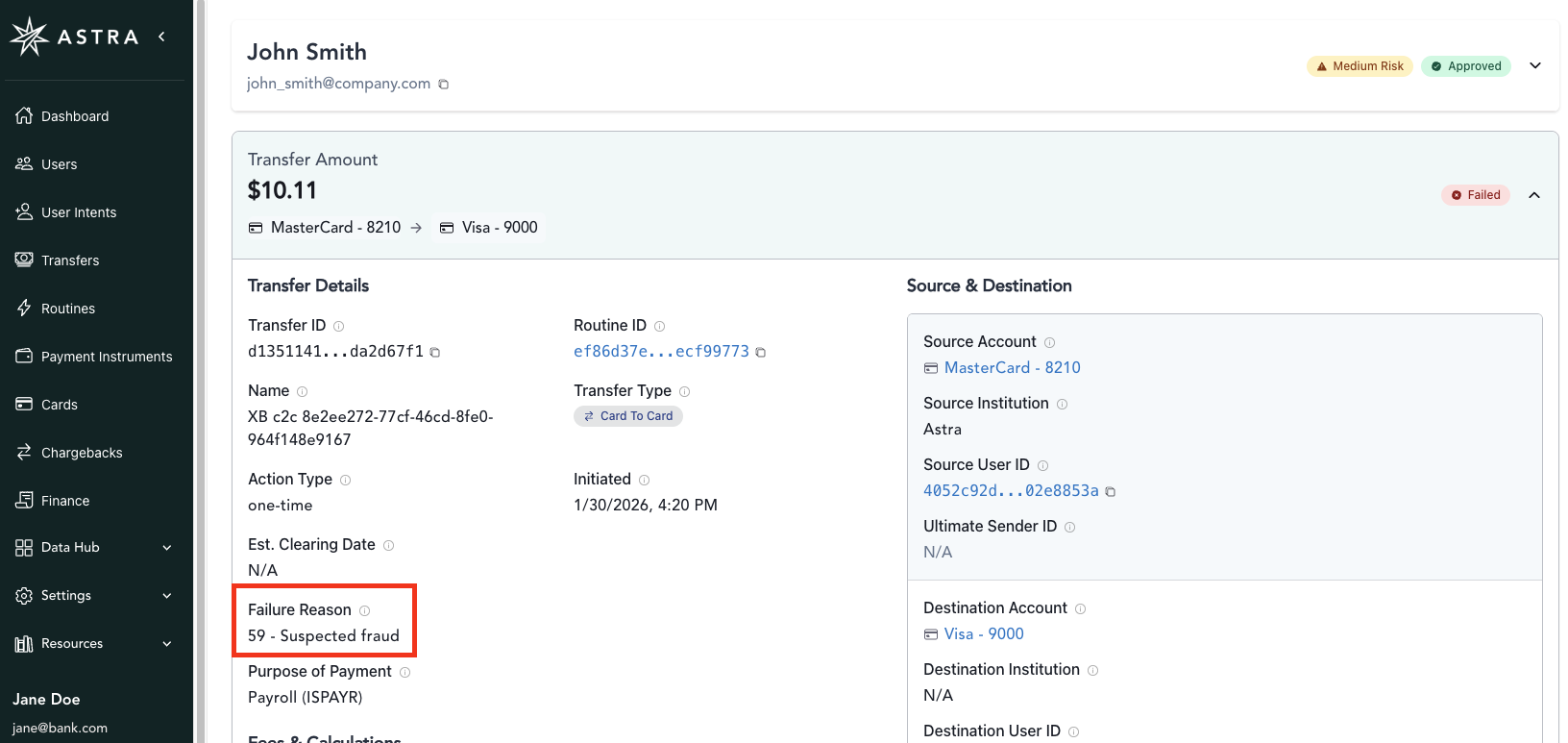
"failure_reason": "59 - Suspected fraud""failure_reason": "05 - Do not honor"
Debit processing error.This failure reason value is also expected, and is for generic processing errors generally related to intermittent network issues.
Example:
"failure_reason": "Debit processing error."
Since debit network decline codes can change and extend beyond the list provided here, we'd suggest adding a generic fallback for anything unrecognized failure reason.
Via Dashboard:
On the transfer details page, the Failure Reason is similarly shown. The same value for a particular transfer returned via the API is present here.
Frequently Asked Questions?
The debit decline codes (sometimes colloquially referred to as error codes) can be somewhat generic, can you tell me the real reason for a decline code for a given transfer?
No Astra does not know the exact reason why the issuing bank declined a transaction. Ultimately, the reason for any decline code is unique and specific to the issuing bank of the card. One institution might use a decline code with slightly different qualifying factors than another institution. To find out further details behind the decline, the owner of the card must contact their issuing bank for further details.
This card was working in previous transfers, why am I now seeing a decline code and/or why is the decline code changing between transaction attempts?
Since the issuing bank is the most common source of decline codes, user activity observed by the bank can have an impact on approving the current transaction, and in the event of failure the, decline code their system returns. The issuing bank may change the decline response for any reason.
Debit Decline Codes
01 Refer to Issuer
The card issuer has indicated there is a problem with the credentials used in this transaction. The User should contact their bank and use an alternate card.
02 Refer to Issuer, Special
The User's card issuer has indicated there is a problem with the card number. The User should contact their bank and use an alternate card.
03 No Merchant
This error indicates that either the Client's merchant account is non-functional or the details entered for the payment are incorrect.
04 Card Pickup *
The User's card issuer has declined the transaction and requested that the card be retained as the card may have been reported as lost or stolen.
05 Do Not Honor *
Generally, this failure reason indicates a card error rather than an error with the Client's merchant account. The error indicates that the Client's bank is declining the User's card for an unspecified reason. The User should call their bank.
06 Error *
The User's card issuer has declined the transaction as there is a problem with the card number. The User should contact their bank and use an alternate card.
07 Pick up card, special condition
The issuing bank has declined the transaction due to a suspicion of fraud. The issuing bank suspects the card may have been lost or stolen, and the cardholder should contact the bank immediately.
08 Honour with Identification
The "Honor with Identification" part means that the bank requires the cardholder to provide some form of identification to verify the transaction. This could be due to a variety of reasons, such as a potential security risk or the transaction being flagged as suspicious.
09 Request in Progress
The card issuer has indicated there is a problem with the card number. The User should contact their bank and use an alternate card.
10 Partial Approval
A decline code "10 Partial Approval" in a debit transaction means that only a portion of the requested payment amount was approved by the card issuer. This typically happens when the customer's account balance is insufficient to cover the full purchase, but the card network still approves a payment up to the available funds.
11 VIP (Very Important Person)
This typically indicates a "VIP (Very Important Person) Approval" requirement. This means the transaction requires additional authorization, likely from the issuing bank or payment processor, due to factors like the transaction size, location, or potential for fraud.
12 Invalid Transaction *
The issuing bank has declined the transaction because of an invalid format or field. This indicates the card details were incorrect. Check the card data entered. Ensure there are no spaces, or special characters (, &, $) in the card number. This can also occur when the destination card is frozen.
13 Invalid Account
The User's card issuer has declined the transaction because of an invalid format or field. Check the transaction information and try processing the transaction again. An invalid character (e.g. a dollar sign or a space) may be being passed.
14 Invalid Card Number
The card issuing bank has declined the transaction as the card number is incorrectly entered, or does not exist. Check the card details and try processing again.
15 No Issuer *
The User's card issuer does not exist. Check the card information and try processing the transaction again.
16
There is no information available about this debit network decline code.
17 Customer Cancellation
This typically indicates that the transaction was cancelled by the customer or that the card issuer is unwilling to authorize the transaction. This could be due to various reasons, including an insufficient balance, a flagged transaction, or a dispute.
18
There is no information available about this debit network decline code.
19 Re-Enter Last Transaction
The transaction has not been processed and the User should attempt to process the transaction again.
20 Transaction Not Found
This typically indicates that the transaction was not found. This means the payment system could not locate the transaction you're trying to process, which might happen due to incorrect information entered or a temporary issue. To resolve this, double-check the card details and payment information, and try again. If the issue persists, contact your bank for assistance.
21 No Action Taken
The User's card issuer has indicated there is a problem with the card number. The User should use an alternate card, or contact their bank.
22 Suspected Malfunction
The User's card issuer could not be contacted during the transaction. The User should check the card information and try processing the transaction again.
23 Unacceptable Transaction Fee
An unspecified bank error has occurred. The User should attempt to process the transaction again.
24 Unspecified Bank Error
This typically means the issuing bank encountered an issue processing the transaction and declined it for an unknown reason. Temporary network issues can cause declines. It is recommended to try the transaction again after a few minutes.
25 Unable to Locate Record on File
The User's card issuer does not recognize the card details. The User should check the card information and try processing the transaction again.
26 Card Number Wrong Length
This indicates that the card number provided in the transaction is not the expected length for that specific network. It could also mean the account has just been created or the bank BIN number is unknown.
27 Issue Number Required
This indicates that the card issuer is missing or has an error in the transaction. This often happens when the issue number (or card number) is missing, incorrect, or in the wrong format. To resolve this, ensure the card number is entered accurately and try the transaction again. If the issue persists, contact the card issuer or bank for assistance.
28 File Temporarily Unavailable
This means the card issuer's system is temporarily unavailable to process the transaction. This usually happens due to a technical issue at the bank, like server downtime. It is recommended to try the transaction again after a few minutes.
29
There is no information available about this debit network decline code.
30 Format Error
The User's card issuer does not recognise the transaction details being entered. This is due to a format error. The User should check the transaction information and try processing the transaction again.
31 Bank Not Supported by Switch
The User's card issuer has declined the transaction as it does not allow transactions originating through mail/telephone, fax, email or Internet orders.
32 Partial Completion
This indicates that a debit card transaction was completed partially, but the merchant or payment system didn't receive full authorization. This means the transaction went through, but the bank didn't fully approve the entire amount.
33 Expired Card, Capture
The User's card issuer has declined the transaction as the card has expired or the date is incorrect. Check the expiry date in the transaction and try processing the transaction again. Sometimes, this error code will be provided if the expiry date is entered incorrectly, not only for expired cards.
34 Suspected Fraud, Retain Card
The User's card issuer has declined the transaction as there is a suspected fraud on this card number. You should check transactions processed after any declined transactions receiving this particular error to monitor for fraudulent transactions on alternate cards.
35 Card Acceptor, Contact Acquirer, Retain Card
The User's card issuer has declined the transaction and requested that the card be retained.
36 Restricted Card, Retain Card
The User's card issuer has declined the transaction and requested that your User's card be retained.
37 Contact Acquirer Security Department, Retain Card
The User's card issuer has declined the transaction and requested that the card be retained.
38 PIN Tries Exceeded, Capture
The User's card issuer has declined the transaction as the User has entered the incorrect PIN three times.
39 No Credit Account
The bank has declined the transaction because the system is expecting a credit card number and received a debit card number.
40 Function Not Supported
The User's card issuer has declined the transaction as it does not allow this type of transaction.
41 Lost Card *
The User's card issuer has declined the transaction as the card has been reported lost.
42 No Universal Account
The User's card issuer has declined the transaction as the account type selected is not valid for this card number. The User should use an alternate card, or contact their bank
43 Stolen Card *
The User's card has been reported as stolen.
44 No Investment Account
The User's card issuer has declined the transaction as the account type selected is not valid for this card number.
45 AVS Check
A decline code 45 typically means that the Address Verification System (AVS) and/or Card Code (CVV/CVC) information doesn't match what's on file with the issuer, leading to a decline by the account settings.
46 Reserved for ISO use*
The card / account has been closed by the issuing bank or by the card / account owner.
47 Expired Card
This means the transaction is being declined because the merchant is trying to finalize the purchase at a date after the card's valid use period. It's important to verify the card's expiration date and ensure it's not past the current date.
48 (No Title Available)
This typically indicates that the issuer (your bank) has declined the transaction due to insufficient funds or a mismatch between the card number and the payment method. It's also possible that the issuer doesn't support $0.00 card verifications, or that the account associated with a wallet is disabled.
49 (No Title Available)
This typically indicates that there's a referral to the issuing bank for further action. This means that the card network is requesting the bank to make a decision on whether to approve or decline the transaction.
50
There is no information available about this debit network decline code.
51 Insufficient Funds *
The User's card issuer has declined the transaction as the card does not have sufficient funds. Advise the User of this fact, and they should either use an alternate card or contact the issuing bank.
52 No Checking Account
The User's card issuer has declined the transaction as the card number is associated to a checking account that does not exist.
53 No Savings Account
The User's card issuer has declined the transaction as the card number is associated to a savings account that does not exist.
54 Expired Card *
The User's card is expired.
55 Incorrect PIN
The User's card issuer has declined the transaction as the User has entered an incorrect PIN.
56 No Card Record
The User's card issuer has declined the transaction as the card number does not exist. The User should re-enter their card details, or use an alternate credit.
57 Transaction not permitted to cardholder *
The User's card issuer has declined the transaction as this card cannot be used for this type of transaction. The User should use an alternate card, or contact their bank.
58 Function Not Permitted to Terminal
The User's card issuer has declined the transaction as this card cannot be used for this type of transaction. This may be associated with a test card number. The User should use an alternate card, or contact the issuing bank.
59 Suspected Fraud *
The User's card issuer has declined this transaction as the card appears to be fraudulent.
60 Acceptor Contact Acquirer
The User's card issuer has declined the transaction. The User should contact the issuing bank and retry the transaction.
61 Exceeds Withdrawal Limit *
The User's card issuer has declined the transaction as it will exceed the customer’s card limit. The customer should use an alternate card, or speak with their bank.
62 Restricted Card *
The User's card issuer has declined the transaction as the card has some restrictions. The User should use an alternate card, or contact the issuing bank.
63 Security Violation
The User's card issuer has declined the transaction. The customer should use an alternate card, and contact their bank.
64 Original Amount Incorrect
The User's card issuer has declined the transaction due to the amount attempting to be processed. The User should check the transaction amount and try again and contact their bank should the problem persist.
65 Exceeds Withdrawal *
The User's card issuer has declined the transaction as the customer has exceeded the withdrawal frequency limit.
66 Acceptor Contact Acquirer, Security
The User should use an alternative card. Neither network nor the bank can provide more details.
67 Capture Card
The User's card issuer has declined the transaction as the card is suspected to be a counterfeit. The User's card issuer has requested that the card be retained.
68 System Error
This typically indicates that the response from the bank or issuing institution was received too late, causing a transaction to be declined. This can be due to a system error, or other temporary network problems.
69 Field Error
This means there's an issue with the information you entered for the transaction, such as the card number, expiration date, or security code. This code indicates that one or more fields in the transaction has been incorrectly entered.
70 PIN Required
This typically means that PIN data was required but not provided, or that the system was unable to verify the PIN. This often happens when a purchase is being made in person, and the terminal is expecting a PIN to be entered for verification.
71 (No Title Available)
This signifies a "Declined Authorization" or "Pick Up Card" situation. This means the merchant sent an authorization request for a transaction, received a declined response from the card issuer, but proceeded with the transaction anyway. Essentially, the card issuer said "no," but the transaction went through, potentially leading to a chargeback.
72 No Authorization
This indicates an “Improperly Authorized Transaction". This means the transaction was processed without proper authorization from the card issuer, potentially due to a merchant error or other system issues.
73 (No Title Available)
This typically indicates that the card used for the transaction was expired. This means the card is no longer valid, and the transaction was therefore declined by the payment network.
74
There is no information available about this debit network decline code.
75 PIN Tries Exceeded
The User's card issuer has declined the transaction as the User has entered the incorrect PIN more than three times.
76 Incorrect Reversal
This indicates that a payment reversal was attempted, but no matching authorization was found. This usually means a payment transaction was reversed incorrectly or there was an issue with the initial authorization.
77 (No Title Available)
Referred to as "Non-Matching Account Number" or "Point-of-Interaction Error," indicates that the card number provided by the merchant does not match the card number on file with the issuing bank. This discrepancy could point to a fraudulent transaction, an incorrect card number entry, or a system error.
78 Customer not eligible for POS (Star SM ) *
Funds cannot be credited to the User’s card. This decline commonly occurs the very first time a User is attempting to authorize a newly activated cards. Ensure the Card is active and not frozen.
79 Life Cycle
(also seen as Already Reversed or Invalid Account)
This code can be used as a broad lifecycle error:
Card expired
Card not yet activated
Account closed or in a restricted lifecycle state
Transaction type not permitted for the card's current status
or
This generally indicates that the transaction has already been processed and reversed. This means the payment was either previously authorized and then canceled, or it was processed twice and reversed to prevent double charges.
80 (No Title Available)
This typically indicates an issue with the system availability or a general error during the transaction. It can mean the network is temporarily unavailable or that there's a technical problem preventing the transaction from being processed.
81 (No Title Available)
This indicates a fraud-related issue, specifically a "card-present environment" where the cardholder claims they did not authorize or participate in the transaction. This suggests the transaction may have been fraudulent due to someone using the card without the cardholder's permission in a physical location.
82 CVV Validation Error
The User's card issuer has declined the transaction as the CVV is incorrect. The User should check the CVV details (the 3 numbers on the back for Visa/MC). If not successful, the User should use an alternate card.
82 Count exceeds limit (VISANet) *
The User has reached a transaction or withdrawal limit with their bank. The User should contact their bank.
83 Reserved for private use *
The User's issuing bank has declined the transaction. The User should contact their bank.
84 (No Title Available)
Not universally standardized across all debit networks. This typically indicates a problem with the cardholder's account or the transaction itself, often related to a fraud alert or a mismatch with the bank's systems.
85
There is no information available about this debit network decline code.
86 Cannot Verify PIN
This indicates that the Personal Identification Number (PIN) entered by the cardholder could not be validated by the system.
87 (No Title Available)
Typically found in Visa or Mastercard transactions, signifies that the transaction has been declined due to "processor error" or "system problem".
88
There is no information available about this debit network decline code.
89
There is no information available about this debit network decline code.
90 Cutoff In Progress
The customer’s card issuer is temporarily not able to process this customer’s card. The User should attempt to process this transaction again.
91 Card Issuer Unavailable *
The User's card issuer is unable to be contacted to authorize the transaction. The User should attempt to process this transaction again. If the problem persists, there may be an issue with the card issuing bank, and the cardholder should contact their bank.
92 Unable To Route Transaction
The User's card issuer cannot be found for routing. This response code is often returned when the customer is using a credit card number. The User should attempt to process this transaction again.
93 Cannot Complete, Violation Of The Law
The User's card issuer has declined the transaction and has requested the User to contact their bank.
94 Duplicate Transaction
The User's card issuer has declined the transaction as this transaction appears to be a duplicate transmission. Check this is the case and process the transaction again if needed.
95 (No Title Available)
This typically indicates that the customer's card issuer was unable to process the transaction due to a system error. The customer should try the transaction again later.
96 System Error
Typically due to intermittent issues with the debit networks. The User's card issuer was not able to process the transaction at that point in time. The customer should attempt to process this transaction again after a few minutes from the previous failure. If this decline code persists, the end user should reach out to their bank for more information.
97 (No Title Available)
This typically means that the CVV (Card Verification Value) for the debit card transaction was incorrect. To resolve the issue, double-check that the CVV number entered during the transaction is accurate and try again. If the problem persists, contact your bank to confirm the card details or if there are any issues with your account.
5C Reserved for ISO use / Transaction not supported/ Blocked by issuer
Meaning: The issuing bank has blocked this transaction, often due to specific rules applied to the card range or merchant type.
Action: The customer should contact their bank to understand why the transaction was blocked
9G Blocked by cardholder/contact cardholder:
Meaning: The cardholder has activated a block on their card through their banking app or card control tools.
Action: The customer needs to check their banking app, remove the block, or contact their bank
R0 Recurring charge stopped at customer request / Fraudulent transaction prior to embossed valid date (future)
Meaning This decline code applies to scenarios where the issuing bank or the owner of the card requests that recurring charges be stopped, or if a fraudulent attempt at using the card was made.