Creating a Business User for your Business Entity
Last updated: November 21, 2025
Overview
The following guide outlines steps for creating a Business User for your program, from your Astra Oauth Client.
This guide is not for onboarding end-users who are Businesses / Merchants
This is guide is for creating a Business User for your Business Entity / Organization on our Platform.
This flow requires additional OAuth Client configuration updates by Astra.
Background
In order for Astra to create program-level FBO accounts and payment instruments for a client, the program must create a Business User for their organization. This Business User must be associated with the Business Profile created via the Astra Dashboard and this Business User must be approved.
This guide outlines how to onboard and create a Business User using the Business Profile ID from a client's Astra Dashboard.
Step 01: Create a Business Profile
Navigate to your Sandbox or Production Astra Dashboard accordingly. Navigate to the Settings menu and select Business Profile.
Sandbox: Please use fake / dummy data
Production: You must use your real business information as Astra uses this to conduct KYB on your Business. If inaccurate or missing data is submitted, Astra will request additional documentation. Until your program has been KYB verified, your Production Astra client will be restricted.
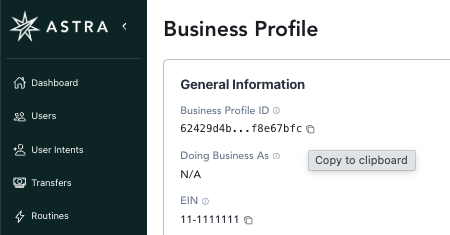
Once created, the Business Profile ID will be available at the top of the User Interface
Step 02: Obtain a Session Token
Using the Business Profile ID from your Astra Dashboard, call Astra’s partner/identity/verification endpoint with the following Payload:
https://docs.astra.finance/reference/post_v1-partner-identity-verification
Client Request
Endpoint: POST /v1/partner/identity/verification
Headers: {
	"Content-Type": "application/json",
	"Accept": "application/json",
	"Authorization": "Basic \*\*\*\*",
}

{
"provider": "",
"provider_data": {
	"customer_id": ""
},

"client_id": "client_123456",
"business_profile_id": "busines_profile_123456"
"user_id": "user_id_123456"
}

Astra Response
{
"token": "token_123456"
}
Only provide one of the following: business_profile_id or user_id
Step 03: Authorize the User
Once you’ve obtained a session_token, call Astra’s partner/identity/token endpoint. This will return your Business User's tokens (an access_token and refresh_token)
https://docs.astra.finance/reference/post_v1-partner-identity-token
Client Request

Endpoint: POST /v1/partner/identity/token
Headers: {
"Content-Type": "application/x-www-form-urlencoded",
"Accept": "application/json",
"Authorization": "Basic \*\*\*\*",
}

{
"token": "token_123456",
"user_consent_captured": true,
"expires_in": 300
}

Astra Response
{
"access_token": "access_token_abc123",
"expires_in": 7200
"refresh_token": "refresh_token_abc123",
"token_type": “Bearer”
}