Partner Identity Verification: How Your Verify Endpoint Fits In
Last updated: November 24, 2026
Overview
The Generate a Partner Identity Verification Token endpoint (POST /v1/partner/identity/verification) returns a short-lived token (session token). You use it to skip the phone OTP in Astra's SDK, or exchange it for access tokens through Authorize a User via API.
For some Trusted Authentication programs, your company is configured as the identity provider. In that setup, Astra confirms the User with your system before issuing the token: during your request, Astra calls a verify endpoint that you host and waits for it to respond. Your verify endpoint has to succeed before Astra can return a session token.
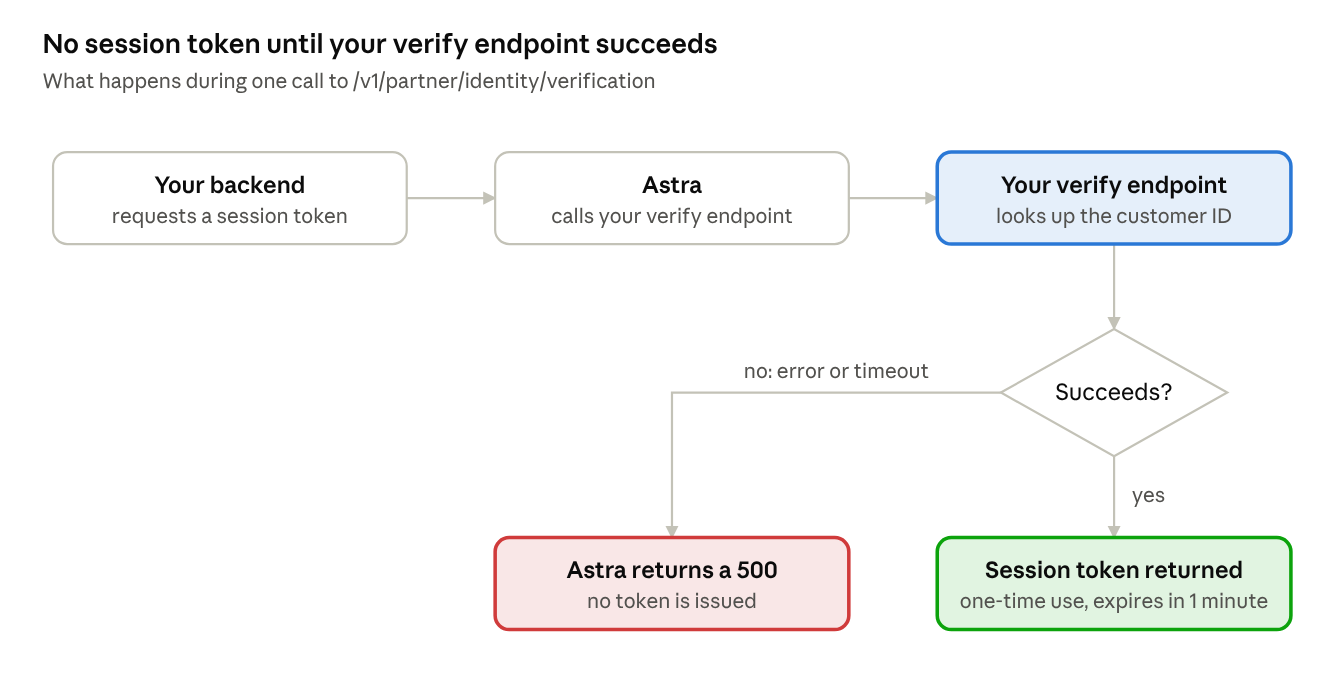
verification request · verify callback
Your verify endpoint sits in the middle of every request. When it succeeds, you get a session token; when it fails, so does the request.
📘
Note: This guide applies only if your client is set up with your own identity provider endpoint. If you're not sure, contact your Astra Integration Specialist.
When Your Verify Endpoint Doesn't Respond Successfully
If your verify endpoint returns an error (for example a 400 or 500) or times out, Astra can't confirm the User, so no session token is issued. Astra then returns a 500 to your original request.
What This Looks Like:
The call to /v1/partner/identity/verification fails quickly with a 500, often in under a second.
Every request for the same User fails the same way until your verify endpoint recovers.
Anything that depends on the session token also stops. For example, a scheduled payment that needs a fresh token won't run.
📘
Note: The 500 comes from Astra, but the root cause is usually your verify endpoint's response. Checking your own logs first is the fastest path to a fix.
What to Check First
Your verify endpoint's logs. Search for requests from Astra at the time of the failure, using the User's customer ID. Look for errors, exceptions, or slow responses.
Your verify endpoint's uptime. Confirm the service was up and reachable at that time.
The customer ID itself. Confirm the User exists in your system and your endpoint returns them successfully. A "user not found" response fails the request just like an outage does.
Customer metadata issues which may result in a 4XX response:
The last_authentication_time was more than 30 days ago. To resolve and allow the User to verify successfully with Astra, you must perform 2FA or equivalent for the end user and update the last_authentication_time
The phone value being in an invalid format or not matching the phone number specified in the User Intent or the existing User record in Astra
When to Retry
Retry only after your verify endpoint is returning successful responses for that User again. Retrying before then repeats the same failure, and the extra calls still count toward your usage limits.
📘
Note: Session tokens are one-time-use and expire after 1 minute. After a successful retry, use the new token right away.
Contacting Support
If your verify endpoint is healthy and requests still fail, contact Astra Support with:
Detail | Example |
|---|---|
Timestamp of the failed request, in UTC | 2026-01-15T14:30:00Z |
The User's customer ID (as sent to your verify endpoint) | cus_12345 |
Your Astra client_id | your_client_id |
The full response body you received | {"code": 500, ...} |
The request-id response header, if present | a1b2c3d4... |
📘
Note: A 500 response may not always include a request-id. The UTC timestamp and client_id let our team find the request without it.
Example (Business A):
Business A made 9 calls between 11:30 and 12:18 ET, all failing in under 1 second with a 347 B response.
The trace showed our GET to Business A's verify endpoint returning a 500, followed by our generic 500 back to Business A.
From Business A's side, it looked like an Astra outage, since they couldn't see their own endpoint's failure.