Transfer Segments and Trace Numbers
Last updated: August 10, 2026
Navigate to a specific Transfer via: https://knowledge.astrafi.com/articles/2084509711-how-to-search-for-a-transfer-in-the-astra-dashboard?lang=en
What are Transfer Segments?
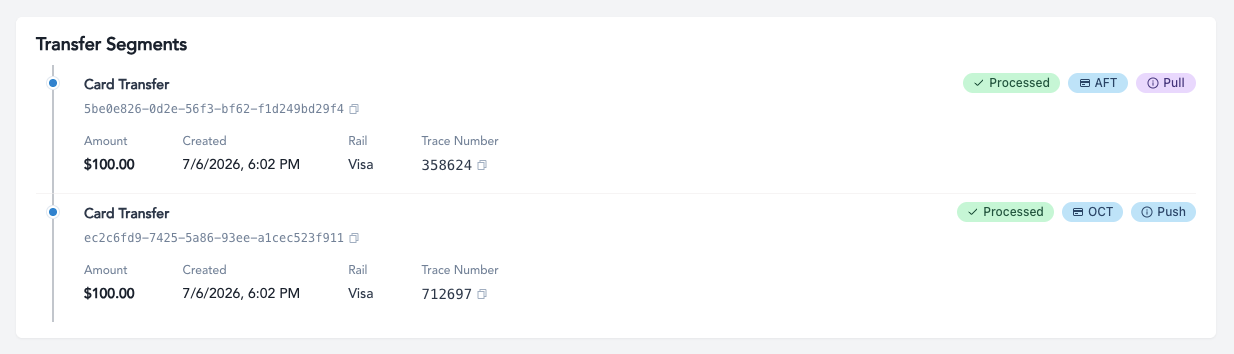
Most Transfers created in Astra are composed of 2 segments: one associated with moving funds from the source (i.e. a debit), and the other with moving funds to the destination (i.e. a credit). Each segment will have a unique transaction ID.
Transfers where funds flow to or from a Payment Instrument entail a Book Transfer, which is internal to Astra’s system. As a result, the Book Transfer segment will not be shown via API or Dashboard.
What are Trace Numbers?
Trace Numbers are unique identifiers associated with each segment of a transfer. Trace Numbers are assigned by the underlying Financial Institution processing the transfer segment.Trace Numbers act like a unique fingerprint that end users can share with their financial institution to locate the underlying segment.
Trace Numbers per Payment Segment
Trace Numbers exist for each and every segment of an Astra Transfer including:
Debit AFTs
Debit OCTs
ACH Credits
ACH Debits
Real-Time Credits (FedNow / RTP)
When will I see Trace Numbers?
Trace Numbers for a given segment will be available once a transfer segment reaches a terminal state, but not always in failure.
The successful terminal transfer segment status when you will see the Trace Number is the status of processed.
For the terminal transfer segment status of failed, its not always a given that a Trace Number will be available. For example, in the event the request never made it to the network, that failed transfer segment will not display a Trace Number.
Where to find Trace Numbers?
Trace Numbers are available through Astra’s API and Dashboard.
API: To fetch Trace Numbers through Astra’s API, use the Transfer Segments Resource: https://docs.astra.finance/reference/get_v1-transfers-id-segments
The
trace_numberfield contains this value
Dashboard: To locate Trace Numbers through Astra’s Dashboard:
Navigate to the Transfer in question.
Scroll to the Transfer Segments overview.