Report an Incident Ticket
Last updated: November 23, 2026
Overview
Use the Report an Incident ticket when an urgent issue with Astra's API or dashboard is affecting the majority of your users. Submitting this ticket alerts our designated on-call team right away, and you'll get a first response within 30 minutes.
This ticket type is reserved for enterprise-tier clients and for genuine, widespread outages. For everything else, our standard ticket types are the fastest route to the right person.
What counts as an incident
An incident is an urgent issue that affects the majority of your user base or blocks a core part of your program. If only one user, transfer or card is affected, it is not an incident.
Submit a Report an Incident ticket | Use a standard ticket instead |
|---|---|
Astra's API is returning errors or timing out for most requests | A single API call or endpoint is behaving unexpectedly → General API Inquiry |
Transfers are failing, stuck or delayed across many users | One transfer failed, was returned or looks wrong → Transfer Inquiry |
Card transactions are being declined across your program | A single card or user has an issue → Transfer Inquiry or General API Inquiry |
The Astra dashboard is down or unusable for your team | A user is waiting on approval → Astra User Approval Review Request |
Webhooks have stopped arriving entirely | A bank account needs review → Review Bank Account for Approval |
A quick test before you submit:
Is the issue happening to most of your users, or to a core flow like transfers or cards?
Is it happening right now, rather than a past event you're investigating?
Will waiting for a standard ticket response cause serious harm to your users or business?
If you answered yes to all three, submit a Report an Incident ticket. If not, use one of the standard ticket types listed above.
How to submit an incident
Sign in to the Astra support portal.
Click the Create Ticket button in the top-right corner.
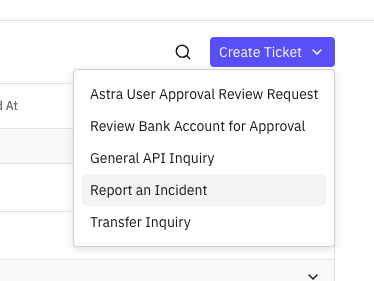
Select Report an Incident from the dropdown.
Fill out the form (guidance below) and click Submit.
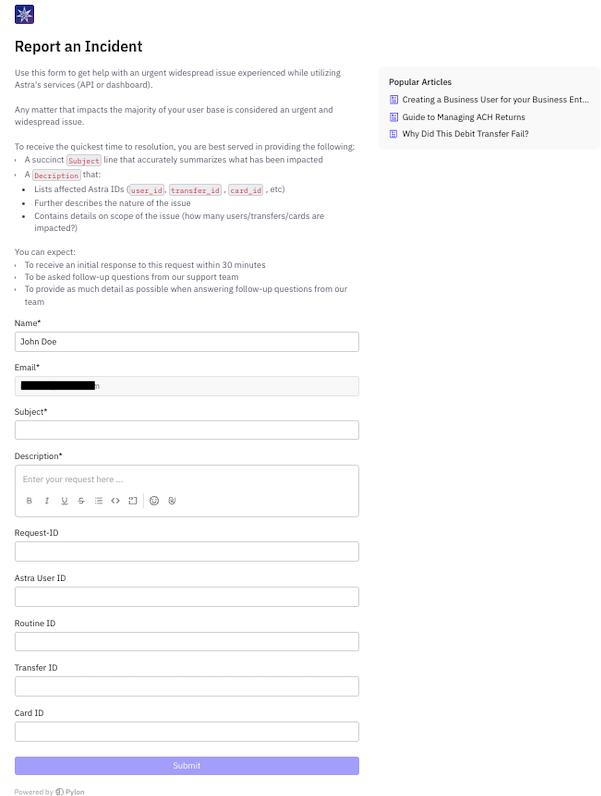
Filling out the form
The more specific you are up front, the faster we can resolve the issue.
Field | Required | What to include |
|---|---|---|
Name | Yes | Your name, so we know who to follow up with |
Yes | Pre-filled from your account | |
Subject | Yes | One line summarizing what is affected, e.g. "ACH debit transfers failing for all users since 9:40 AM PT" |
Description | Yes | What is happening, when it started, how many users, transfers or cards are affected, and any error messages you're seeing |
Request-ID | No | The request ID from a failing API call, if you have one |
Astra User ID | No | An example affected |
Routine ID | No | An example affected routine ID |
Transfer ID | No | An example affected |
Card ID | No | An example affected |
The ID fields are optional, but even one or two example IDs help our team find the root cause much faster.
What to expect after you submit
As soon as you submit, our on-call team is alerted and begins looking into the issue.
First response within 30 minutes. A member of our team will reply on the ticket to confirm we're investigating.
Follow-up questions. We'll likely ask for more details, such as additional IDs, timestamps or examples. Detailed answers help us resolve the issue faster.
Updates until resolved. We'll keep you updated on the ticket as we investigate, and let you know once the issue is fixed.
Please keep all communication about the incident on the ticket so everyone working on it has the full picture.
Not sure which ticket to use?
When in doubt, start with General API Inquiry. If our team sees signs of a wider issue, we'll escalate it for you.