Guide to Multi-Tenant Integrations
Last updated: November 3, 2026
Overview
The following guide provides a high-level overview of what a multi-tenant program is and what it entails to stand up. Please note that every program is different, and as such the exact requirements for each may vary, but in this guide we've captured the core requirements that are applicable to all .
Definitions
Please familiarize yourself with the terms below, as they'll be referenced frequently throughout the guide:
Standalone Application: an application with end-users / consumers.
Platform Application: a SaaS environment supporting "n" number of standalone applications.
Tenant: A direct client of Astra
Sub-Tenant: A client of a client of Astra.
Multi-Tenant: A client of Astra onboarding sub-tenants to Astra's platform.
API-Keys: unique ids and passwords used to identify a tenant or sub-tenant. Each tenant / sub-tenant has a unique pair of keys: (
client_id+client_secret)Astra Dashboard: a portal which stores and displays a tenant's / sub-tenant's Astra data and includes access to key information such as the tenant's / sub-tenant's API Keys.
Standalone vs. Platform Applications
Astra's platform supports two key program application types: standalone applications and platform applications. Examples:
Standalone Application
Astra's platform
Client A's standalone application (tenant)
End-Users of Client A's standalone application
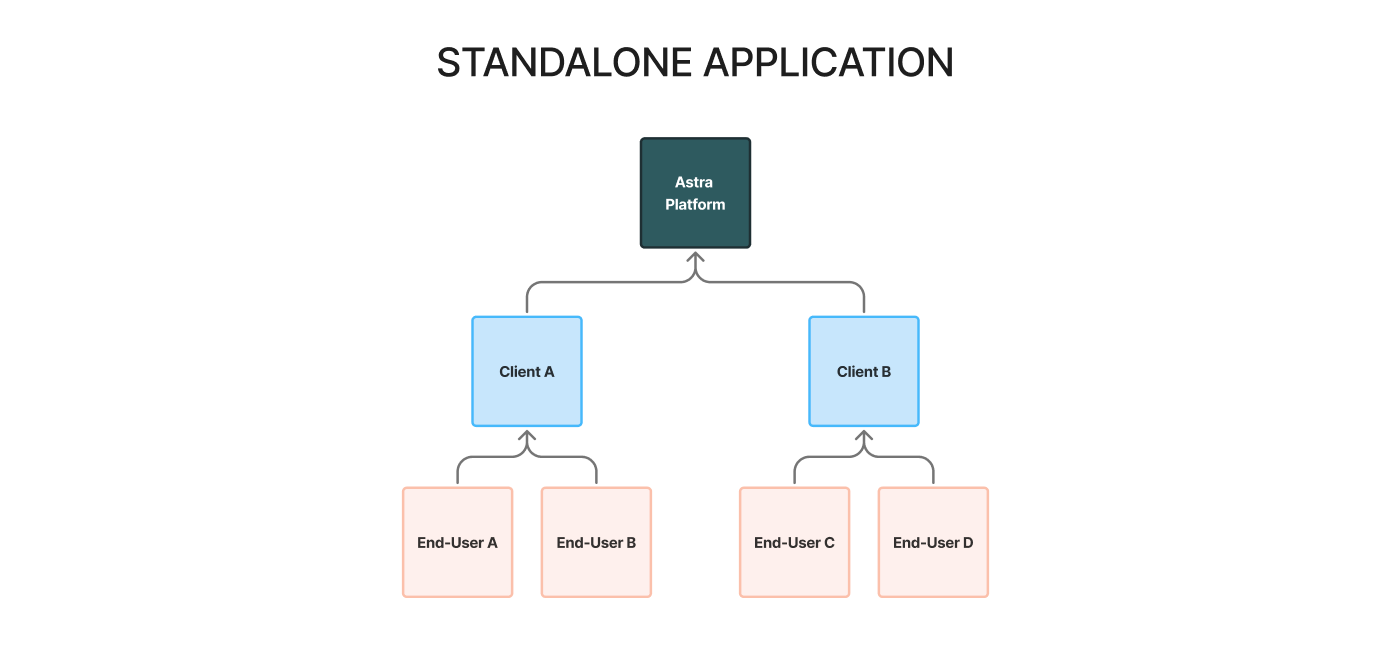
Standalone Applications require a single tenant to operate. This effectively means one Astra Dashboard / one pair of API Keys for each tenant.
Platform Application
Astra's Platform
Client A's platform application (tenant)
Client B's standalone application (sub-tenant)
End-Users of Client B's standalone application
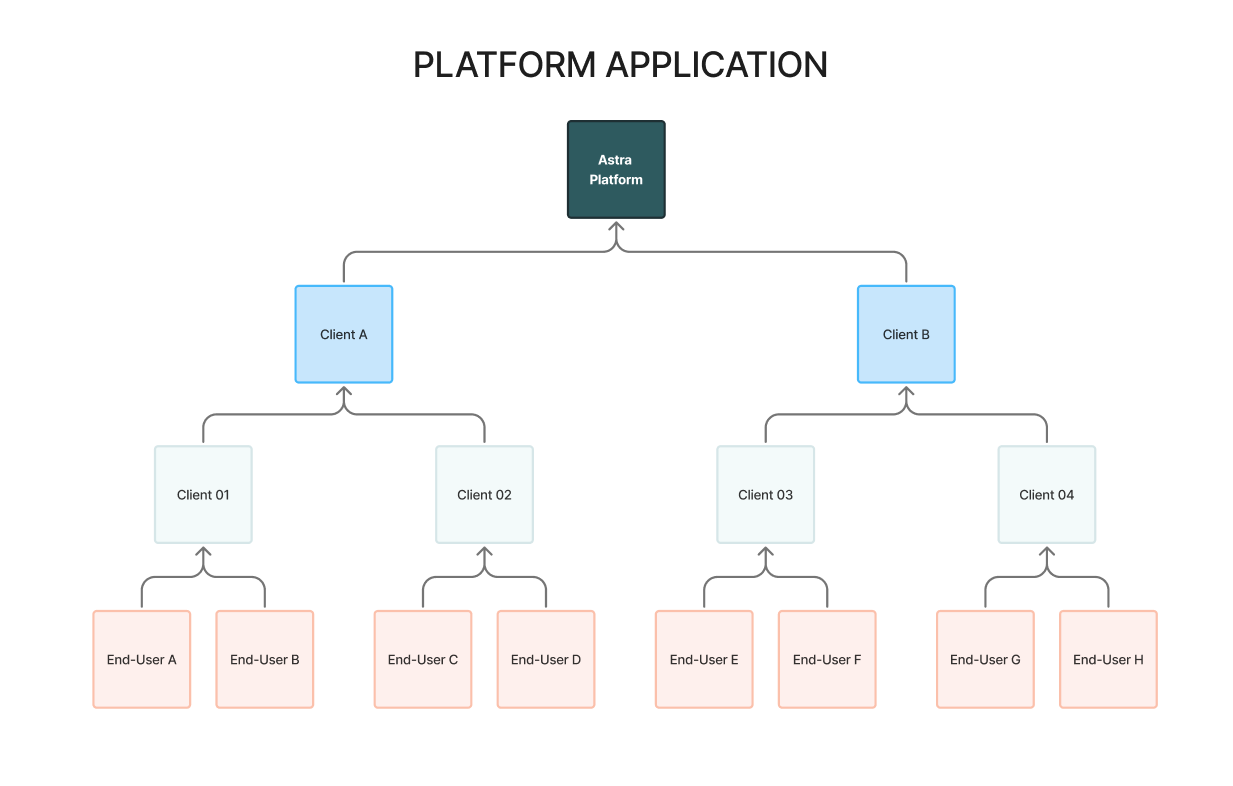
Platform Applications require multiple tenants to operate. This effectively means one Astra Dashboard / one pair of API Keys per sub-tenant of Astra's tenant.
Multi-Tenant Set up
For tenant's approved to onboard sub-tenants, there are several key steps that must take place:
Client Action Items
Submit a Sub-Tenant Program Application
Provision Sub-Tenant API Keys
Submit Sub-Tenant's Business Profile for KYB
Connect a Corporate Bank Account for Auto-Debiting
Provide FBO Principal Name
Fund a Sub-Tenant FBO Reserve Account
01 | Submit a Sub-Tenant Program Application
Each Sub-Tenant is required to submit a Sub-Tenant Program Application. Your Program's implementation manager will provide a link to a reusable application. This application collects business information as well as information regarding the Sub-Tenant's product(s) and use case(s).
Astra's compliance & risk team will review the application and ultimately determine whether the Sub-Tenant and their use case(s) can be supported within Astra's compliance framework.
Approved applicants may proceed to step 2. Rejected applicants are not permitted to onboard to our platform through our Tenant.
In some cases, our compliance & risk team will have additional follow up questions which will appear in the comments section of the program application.
02 | Provision Sub-Tenant API Keys
Once the Sub-Tenant's application is approved, you may proceed with provisioning their API keys through the following link: http://dashboard.astra.finance/login
Each Sub-Tenant login requires it's own unique set of login credentials. We recommend using the following nomenclature for each login:
Format: <your name>+<tenant name>@<your domain>.com
Examples:
Note: the individual who provisions the API-Keys will automatically be assigned the Owner role in the Astra Dashboard. Please review the following article to learn more about Dashboard roles and how to add team members.
03 | Submit Astra Dashboard Business Profile
Once API-Keys have been provisioned, Astra will need to conduct KYB on the Sub-Tenant. To kickoff this process, the Business Profile, located in the Settings tab of the Sub-Tenant's Astra Dashboard needs to be filled out and submitted.
Best Practice: To avoid delays in KYB approval, all information must be submitted and all submitted information must be true and accurate. Providing null data or placeholder data (e.g. last 4 of SSN as 0000) will result in step up verification procedures requiring additional documentation.
04 | Connect a Corporate Bank Account for Auto-Debiting
All Sub-Tenants are required to connect a corporate account that Astra's system will automatically debit for any of the applicable cases:
Interchange & Network Fees
Lost Chargebacks
ACH Returns (that result in a negative program balance, e.g such as R10)
Note: This could be the Tenant's or Sub-Tenant's corporate account.
05 | Provide FBO Principal Name
As part of configuring a Sub-Tenant's Production API client, Astra must create specific For-Benefit-Of or FBO accounts, which are sponsored by our Partner Banks. In order to create these FBOs, we must receive the first and last name of the FBO principal.
The principal is the individual who owns or controls the business. Astra's partner banks collects this information because compliance regulations require them to identify and screen not only the legal entity, but also the people who own or control it for AML, KYC, and sanctions compliance purposes.
Note: This needs to be a Principal of the Sub-Tenant.
06 | Fund a Sub-Tenant FBO Reserve Account
All Sub-Tenants are required to have Reserves with Astra. These reserves can be supplied by the Tenant or directly by the Sub-Tenant. As part of configuring and enabling a Sub-Tenant for real-world Transfers, Astra will provision an FBO Reserve account for the Sub-Tenant, sponsored by our Partner Bank. The account details of this FBO will be available via API and through the Sub-Tenant's Astra Dashboard, specifically via the Payment Instruments table.
Reserve requirements are unique to each program and are calculated based on a variety of factors including the program's use cases, transfers volumes, transfer limits, and overall maturity.
Reserve requirements will be determined by Astra's risk and finance teams. The amount along with funding instructions will be shared with the tenant by your Astra Implementation Manager
Note: Reserves cannot be used for Auto-Debiting (see Step 04)
Additional Notes
Each Tenant is unique and may have vary requirements to support their multi-tenant integrations. Astra will provide each tenant with a curated, minimal, and reusable integration checklist template to help manage the onboarding of each Sub-Tenant.