Guide to Idempotency Keys
Last updated: November 6, 2026
Overview
An idempotency key lets you safely retry an Astra API request that creates a card or a routine, so a timeout or dropped connection doesn't add a card or move money twice. By sending the key in the Idempotency-Key request header and if Astra has already processed a request with that key, it returns the original result instead of creating something new.
Keys are scoped to your client, so a key that another client uses never conflicts with yours.
Supported endpoints
The key format and how long Astra honors a key depend on the endpoint. Transfers are created through routines, so the key on the routine request is what protects its transfers.
Endpoint | Key format | How long Astra honors the key |
|---|---|---|
| UUID (required) | 24 hours. After that, Astra treats the key as new. |
| UUID (required) | Indefinitely, once the routine is created |
| UUID (required) | Indefinitely, once the routine is created |
| UUID (required) | Indefinitely, once the routine is created |
| UUID (required) | Indefinitely, once the routine is created |
For consistency, use a version 4 UUID on every endpoint, such as 550e8400-e29b-41d4-a716-446655440000.
POST https://api-sandbox.astra.finance/v1/routines
Authorization: Bearer <access_token>
Idempotency-Key: 550e8400-e29b-41d4-a716-446655440000
Content-Type: application/json
What happens when you reuse a key
Cards and routines handle a repeated key differently. On cards, a key is tied to one card add. On routines, a key is tied to one set of request parameters.
You send the same key with | Cards | Routines |
|---|---|---|
The same request | Returns the original card with | Returns the original routine with |
Different details | Returns | Creates a separate routine (different payload, for example amount, source, destination, etc.) |
A request that's still in progress | Returns | Not applicable |
On POST /v1/routines, Astra validates a repeated request again before it returns the original routine. If something changed since the first request, such as a start date that has now passed, the repeat can return a validation error. The book, account-to-card, and card-to-account endpoints return the original routine without validating it again.
Retry a request
Whether you retry with the same key or a new one depends on how the request failed.
If the request | Then |
|---|---|
Timed out or lost its connection | Retry with the same key and payload. Astra returns the original result or completes the operation once. |
Returned | Wait for the |
Was rejected with a | Nothing was created. Fix the request, and then retry with the same key. |
Created a routine whose transfer failed later | A retry with the same key returns the original routine and doesn't start a new transfer. Use a new key if you want to create a new routine. |
Created a card with a rejected status | A retry with the same key within 24 hours returns that card and doesn't evaluate it again. Use a new key to request a new evaluation. |
To retry safely:
Generate the key once, before the first attempt, and store it with your record of the operation.
Send the same key, unchanged, with every retry of that operation.
Wait longer between attempts with exponential backoff (for example, 1, 2, 4, and then 8 seconds, etc. until you reach a maximum retry period. A retry limit (time or count) is also highly encouraged).
Log the key with each attempt so you can trace what happened.
The following Node.js example creates a routine and applies these steps:
import { randomUUID } from "node:crypto";

async function createRoutine(body, accessToken, maxAttempts = 5) {
  const idempotencyKey = randomUUID(); // generated once, reused on every retry

  for (let attempt = 0; attempt < maxAttempts; attempt++) {
    try {
      const res = await fetch("https://api-sandbox.astra.finance/v1/routines", {
        method: "POST",
        headers: {
          "Content-Type": "application/json",
          "Authorization": `Bearer ${accessToken}`,
          "Idempotency-Key": idempotencyKey,
        },
        body: JSON.stringify(body),
      });
      if (res.status < 500) return res; // success or a 4xx to handle
    } catch (err) {
      // network error or timeout: safe to retry with the same key
    }
    console.log(`Retrying routine, key=${idempotencyKey}, attempt=${attempt + 1}`);
    await new Promise(r => setTimeout(r, 2 ** attempt * 1000));
  }
  throw new Error(`Routine creation failed after ${maxAttempts} attempts (key=${idempotencyKey})`);
}
Idempotent Routine Creation Recommendation
https://docs.astra.finance/docs/recommendations-for-a-robust-integration#routine-creation
Errors
These are the only errors that the Idempotency-Key header can cause. POST /v1/routines returns no idempotency-specific errors.
Status | Endpoint | Cause | What to do |
|---|---|---|---|
|
| The key is blank or longer than 255 characters. | Send a key of 1–255 characters. |
|
| A card add with the same key is still in progress. | Retry with the same key after the |
|
| Within the last 24 hours, the key was used for a different card, or for the same card and a different user. | Send a new key. |
|
| The key isn't a UUID. | Send a UUID. |
The routine 400 error names the field idempotency_key, even though the value comes from the header. Other validation errors in the same request appear alongside it:
{
  "description": {
    "idempotency_key": ["Not a valid UUID."]
  },
  "name": "RequestDataError",
  "status_code": 400
}
Example: Retry a routine request after a timeout.
In both examples, the first POST /v1/routines request succeeds, but the response never reaches your client because the connection times out. Your client then retries. The correct retry sends the same key and the same payload, and Astra returns the original routine.
Scenario where you retry with a new Idempotency-key
If the retry uses a new key, Astra treats it as a new request and creates a second routine. The customer is charged twice.
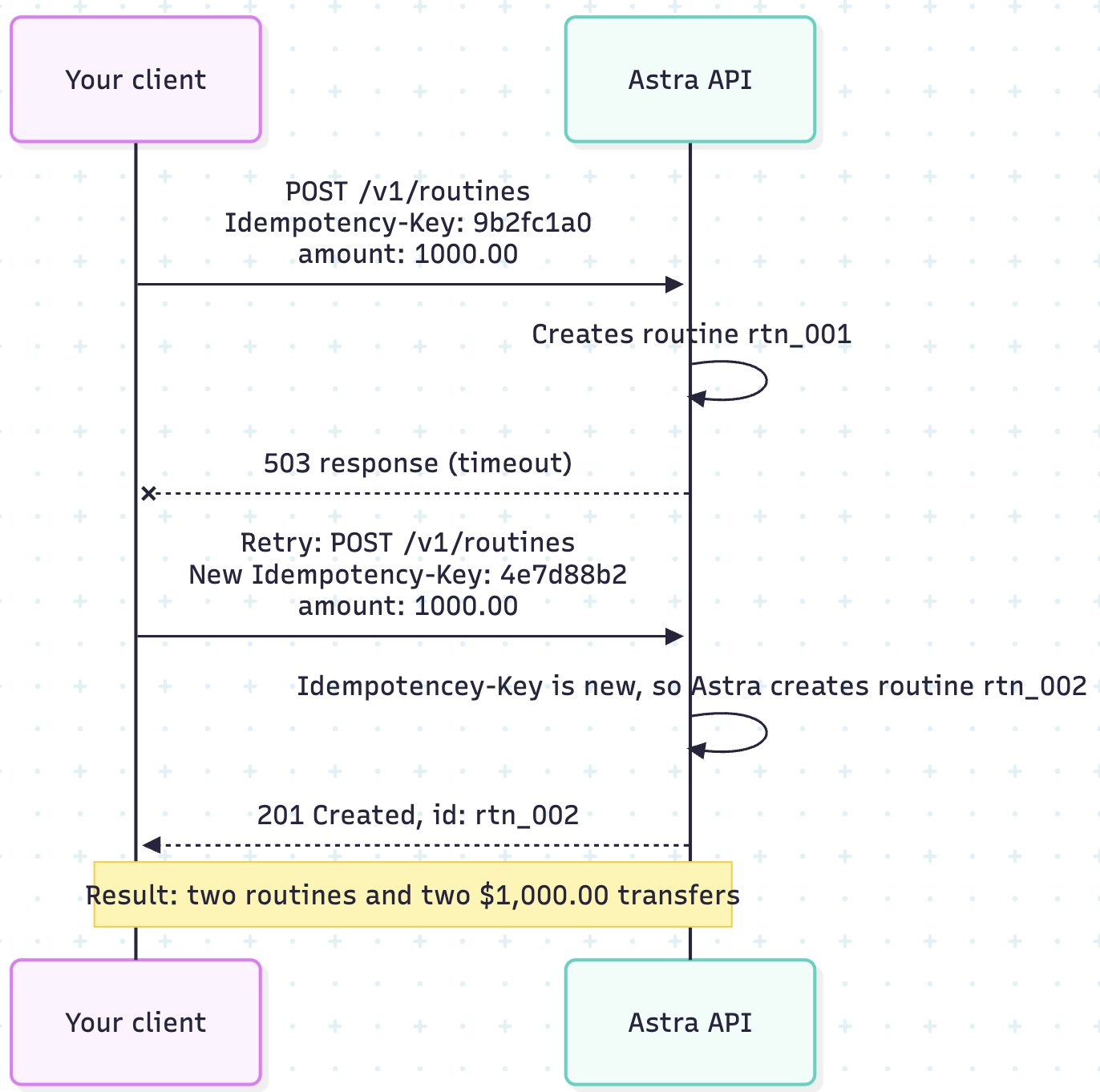
The retry returns a different routine ID (abbreviated response):
{
  "id": "rtn_002",
  "type": "one-time",
  "name": "Rent payment",
  "amount": 1000.00,
  "client_correlation_id": "INV-1001",
  "status": "active"

}
Retry with the same key and a different property in the payload
The retry sends the same key, but the payload has a new client_correlation_id. Because the payload no longer exactly matches the first routine request, Astra treats it as a new request and creates routine B. The same thing happens if any other field in the payload changes.
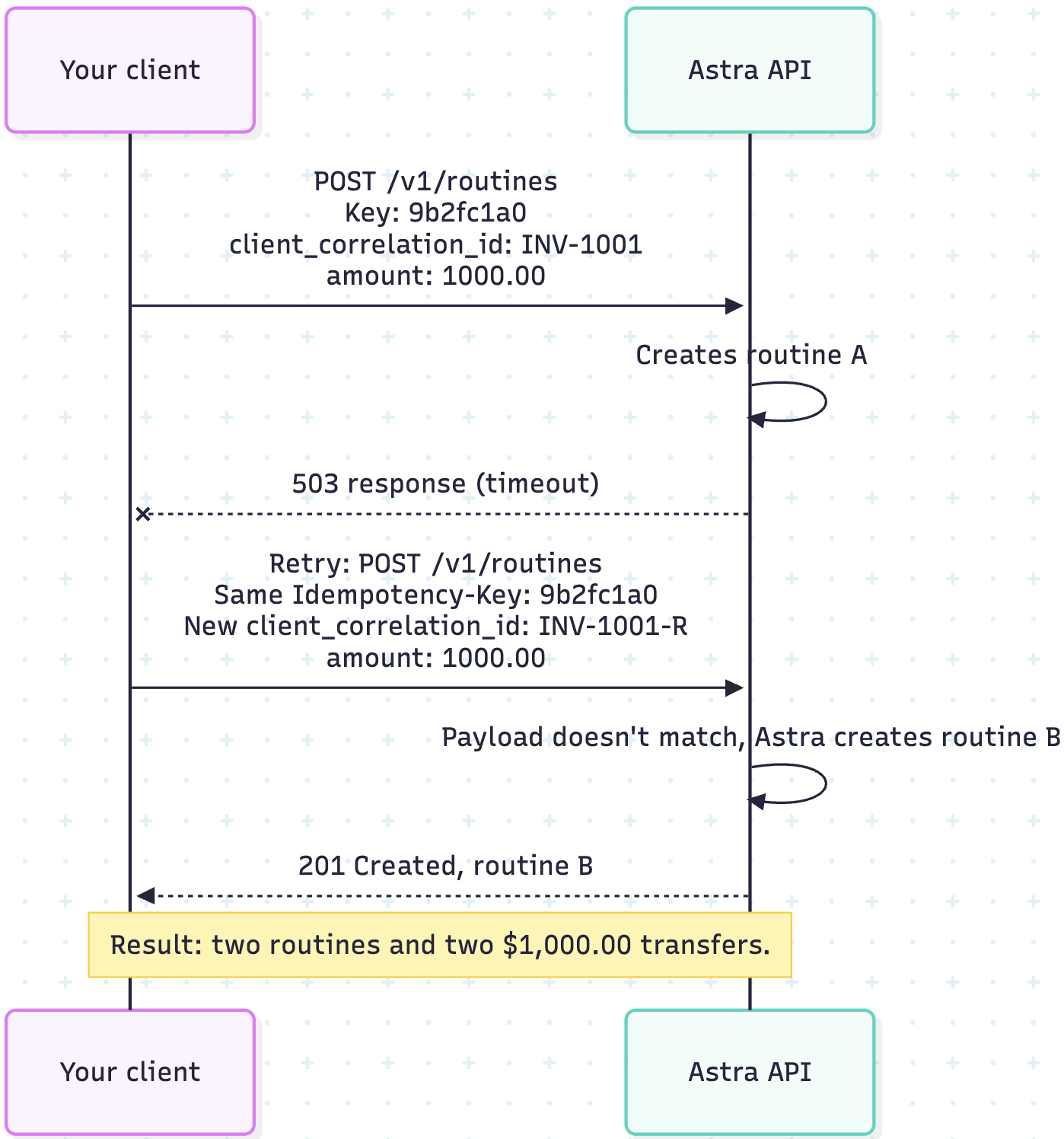
The response returns a new routine with the new client_correlation_id (abbreviated response):
{
  "id": "<routine B id>",
  "amount": 1000.00,
  "client_correlation_id": "INV-1001-R"
}
To prevent duplicates, build the payload once, store it with its key, and resend both unchanged on every retry. For more information, see the Routine Creation section of our Recommendations for a Robust Integration doc.
Troubleshooting
Symptom | Likely cause | Fix |
|---|---|---|
Duplicate transfers or cards | Your client generates a new key on each retry, or sends no key. | Generate one key per operation, before the first attempt, and pass it to your retry logic. |
A retried routine created a second routine | The retry changed the amount, source, or destination. | Retry with the same parameters, or treat it as a new operation with a new key. |
A failed transfer won't run again | The retry reused the original key, so Astra returned the original routine. | Use a new key for the new attempt. |
| The key was used for a different card in the last 24 hours. | Use a new key for each card add. |
Test runs return results from earlier runs | Tests use hard-coded keys. | Generate a new UUID in each test run. |